A utility app for remote GoPro control and automation
Camera Tools for GoPro® Heros is a third-party utility designed to give users greater control over their GoPro cameras. It’s built for those who need remote access, scheduled recordings, or multi-camera workflows—making it ideal for creators, drone pilots, and time-lapse photographers. Unlike editing apps, Camera Tools focuses on control and automation, not post-production.The app supports a wide range of GoPro models, including HERO3, HERO4, and newer, and works over Wi-Fi. It offers a streamlined way to manage connected cameras without relying on GoPro’s official software, especially in more technical or production-heavy environments.
Top Recommended Alternative
How does Camera Tools enhance GoPro workflows?
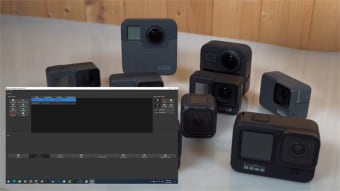
Camera Tools provides remote control over essential functions like recording, changing shooting modes, and adjusting camera settings on the fly. Users can connect and operate multiple GoPro cameras simultaneously, making it easy to coordinate synchronized footage across different angles or devices. This is especially useful for creators working with drone rigs, multi-cam vlogs, or time-lapse installations. The app’s interface allows for scheduled tasks, including starting or stopping recordings at specific times—a valuable feature for capturing sunrise shots, wildlife activity, or long-duration events without manual intervention.
Beyond standard remote commands, the app also supports batch media downloads, making it easier to offload content from multiple cameras at once. These functions are ideal for users who require off-site access or want to streamline repetitive workflows. For example, batch downloads help quickly consolidate large amounts of footage without needing to manually connect to each camera, which is particularly helpful in multi-device shoots.
While Camera Tools doesn’t include video editing tools, it does offer live footage preview alongside its remote control functions. This balance makes it a reliable solution for users who prioritize workflow efficiency, technical flexibility, and hands-free camera operation in demanding environments.
Is Camera Tools worth using?
For users who work with GoPro cameras in planned or remote scenarios, Camera Tools is a practical and efficient utility. It adds a layer of flexibility missing from the official GoPro app and supports creative workflows that rely on automation, batch control, scheduled capture, and live preview. Though it lacks editing features, it delivers exactly what its name promises—tight, reliable camera tools for serious users.